Explore the mySugr app

Welcome to the mySugr app - one powerful app with more than 7 million* registered accounts worldwide. As a function of the mySugr app, you can use mySugr Glucose Insights for the continuous display and read-out of real-time glucose values from your Accu-Chek SmartGuide CGM sensor.
With the mySugr app, you can also keep track of insulin injections, your carbohydrate intake, your activity, your meals, and much more. 
You can access real-time CGM values directly on your mobile device or on your Apple Watch. The sensor sends a CGM value to mySugr Glucose Insights every 5 minutes.

  • To  wear a sensor paired with the mySugr app, you need a paired sensor. The features of mySugr Glucose Insights are only available when the mySugr app is running and you are signed in.

  • Make sure to enable notifications and critical notifications from the app to get the most out of it.

  • When the CGM value falls outside the measuring range of the sensor, which happens above 22.2 mmol/L or below 2.2 mmol/L, the Home screen will display HI or LO instead of a numerical value.

How to read the Home screen

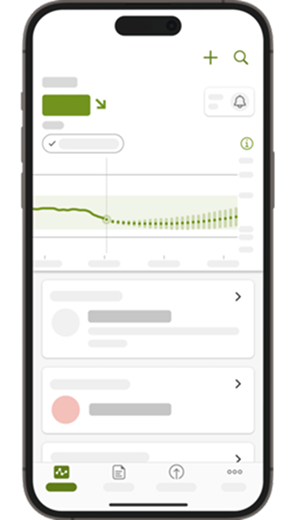
The Home screen provides all important information for your diabetes management at a glance:

Screenshot of mySugr Glucose Insights’Home screen.

  1. Latest CGM value and trend arrow

    Shows your latest CGM value, and a trend arrow that indicates the direction of your glucose levels.

  2. Unit of measurement
  3. Sensor Mode

    The current mode of your sensor is shown under the CGM value. A calibrated sensor is in Therapy Mode, and an uncalibrated sensor is in Trend Mode.

  4. Alarm Profile

    Current state of your alarm profile: This icon indicates which alarms are currently on or which are off. See alarms and reminders for more.

  5. Quick Start Guide

    Tap this icon to open the quick start guide.

  6. A graph of the last two hours

    The graph shows an infinite history of your glucose readings in relation to your target range. 

  7. Latest logbook entries

    View all your manually entered (or imported) glucose readings and other information you’ve recorded in the logbook.

  8. Current CGM value
  9. Prediction

    The dark green dots show your estimated average glucose levels for the next two hours, based on your CGM. The prediction becomes less accurate over time, which is why the vertical bars get wider.

Trend Mode

Before your sensor is calibrated, it has not reached its full accuracy. This is why you should not make therapy decisions, such as bolus calculations, based on the value provided by a sensor in Trend mode.

Therapy Mode

After you calibrate the sensor, it will show that it’s ready to use. This means the glucose levels it measures can be used to make therapy decisions, such as insulin dosing.

"More" Menu
Use the More Menu to see:
  • Account & Settings (basic therapy info, glucose measuring, insulin therapy, and more)
  • CGM Settings (high & low alarms, Prediction alarms, Sensor notifications, Critical alerts )
  • mySugr Bolus Calculator Settings*
  • Support and Feedback
  • Challenges
  • User Manual

*dependent on market availability and your therapy type

mySugr Logbook 

Logbook entries
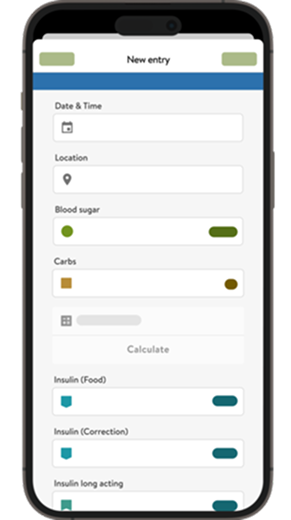
Record and track your insulin, meals, and more in the logbook, so you can learn how these factors affect your glucose levels. You can use the mySugr Logbook to:
  • Import blood glucose meter readings, or add them manually.
  • Track your insulin.
  • Log your carb intake, and store your favorite meals with "Meal Photos".
  • Keep track of your activity.
  • No more guesswork: use the mySugr Bolus Calculator* to calculate the right amount of insulin for corrections and mealtimes.

*dependent on country availability

  • Explore the mySugr app

    You can't delete logbook entries containing glucose values that were used for calibrating your sensor.

    “Bolus Calculator” might be grayed out because there is no carb/blood glucose to trigger a calculation. The mySugr Bolus Calculator’s availability depends on the therapy type of the user. If insulin-dependent, then the field is there. This is applicable with or without PRO.

How does your logbook information affect predictions?

mySugr Glucose Insights considers your logbook data in predictions, such as your carbohydrate intake. You need to log your meals continuously in the mySugr Logbook in order to benefit from the detection of a breakfast- or meal-associated pattern in mySugr Glucose Insights. The first 20 min after creating an entry with carbs, glucose prediction features are temporarily unavailable. This ensures that it can properly consider the changes after you log carbs or insulin. 

User Manual

If this is your first time using the mySugr app, you can always refer to the User Manuals of the mySugr Logbook and mySugr Glucose Insights in the More section.

Enable notifications

Stay informed about your glucose levels and trends with customizable notifications. You can personalize them to meet your needs. For more information, see alarms and reminders.

Get in touch

Click here for more details on how to get in touch with us.

Contact us