

After pairing the sensor, you should calibrate your sensor to receive your CGM values.

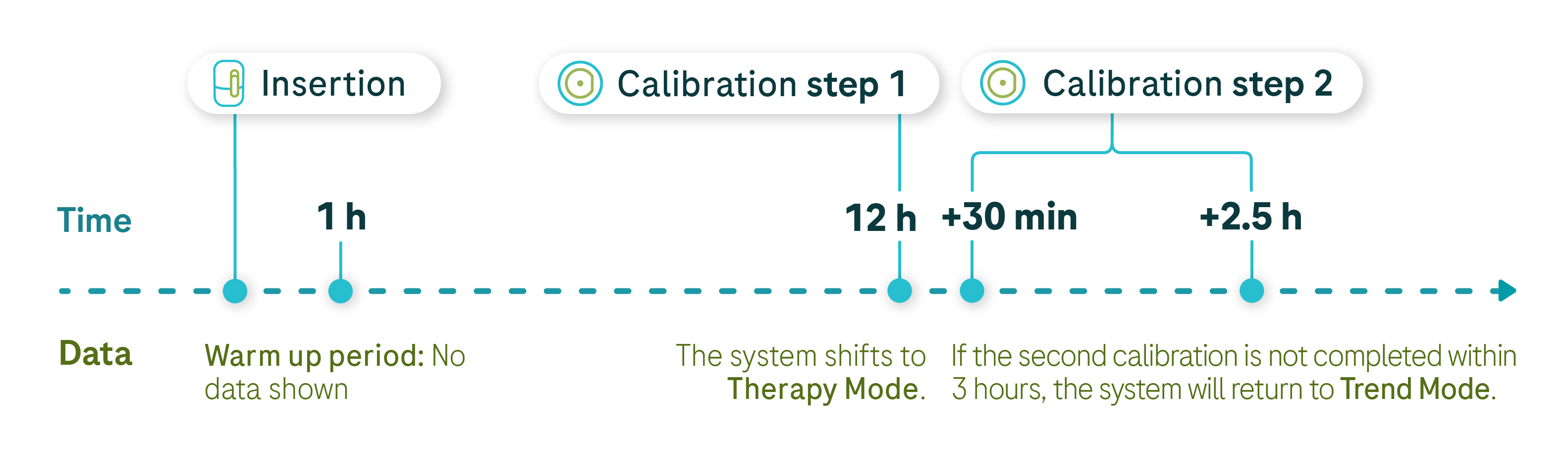
The sensor requires calibration to provide you with the most accurate readings possible:
- Before calibration, the sensor will be in Trend Mode. You can see CGM values, but should not use them for therapy decisions.
- A calibrated sensor will be in Therapy Mode. You can use these values to inform therapy decisions (e.g., to adjust insulin doses).
The user calibration routine consists of two steps:
- The app will prompt you to calibrate 12 hours after applying the sensor.
- A second request will appear 30 minutes to 3 hours after the initial calibration.
Image
You should calibrate your sensor:
- Whenever mySugr Glucose Insights prompts you to do so.
- At home or in a stable environment, 2 to 27℃ (avoid very hot, very cold, or rapidly changing temperatures).
- At a time when your blood glucose is stable (not shortly after a meal, insulin injection, or physical activity).
If calibration is unsuccessful, wait 30 minutes before trying again.

Here’s how to calibrate the sensor
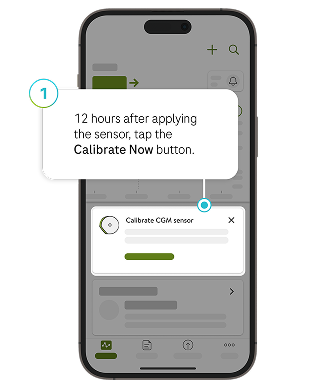
Step 1
Wash your hands with warm, soapy water and dry thoroughly. The app will prompt you to calibrate 12 hours after applying the sensor. Tap the Calibrate Now button.

Step 2
Take a glucose reading with your glucose meter. When you enter it into the Calibrate screen, the reading must be within the 2.2 mmol/L and 22.2 mmol/L range. This value should be entered no later than 3 minutes after performing the test. Make sure the value is correct because you cannot change it later.

Step 3
Immediately after performing the test, enter your blood sugar reading. Make sure the value is correct. Tap Confirm to proceed, or Keep editing to return to the previous step.
If you confirm an incorrect value, system performance cannot be guaranteed. Discard the sensor, apply a new one, and repeat the previous steps.

Step 4
If calibration is successful, a confirmation message will appear. In case of unsuccessful calibration, wait at least 30 minutes before repeating the process using a new reading from your blood glucose meter.
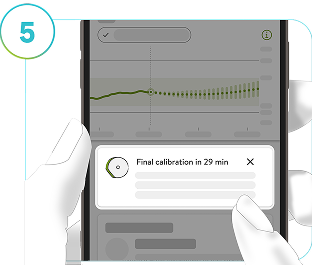
Step 5
Calibrate the sensor whenever the app prompts you to do so.
User calibration
When using a user-calibrated sensor, you should enter the second calibration value 30 minutes to 3 hours after completing the first calibration test.
Tap Calibrate Now and repeat steps 2 to 4. After these steps, your system stays in Therapy mode until the end of the sensor wear time.
If the second calibration is missed, the sensor returns to Trend mode. Once you perform the second calibration, the sensor goes back into Therapy mode.
When prompted to calibrate the sensor, prepare for a test at your earliest convenience.
How helpful did you find this training?
Continue Training
Previous step

Next step
Accu-Chek Newsletter
Stay informed about diabetes
Get diabetes management tips and news delivered right to your inbox.